Completion requirements
View
1. Introduction
After completing this module, you are expected to:
- Enhance web pages by incorporating links styles and events using CSS
- Identify and practice the latest updates in CSS, particularly image sprites.
Graphical elements in websites have become more common to make web pages more appealing and interactive for viewers. Images make web pages come to life and make the appearance of websites more interesting. The downside of using many images on a web page is it makes the loading time slower. Browsers request information from servers to display web pages, and a request only has a specific size limit. Images contribute largely to the file size of the web page. When a web page has a large file size, the browser needs multiple requests from the server to display the whole web page, making the loading time slower.
To reduce the number of requests, web developers combine multiple images into a single image. This resulting large image is called image sprite. It is a combination of many images. Given below are some examples of image sprites:

Figure 1. An image sprite for different icons of social media sites
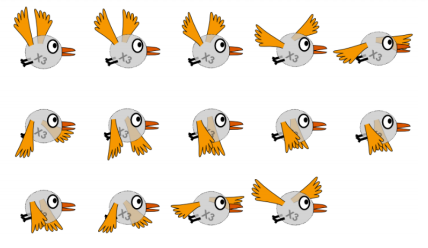
Figure 2. A character at different frame shots of a single movement
Image sprites are used by retrieving a single image and displaying small parts of the image at
a given instance. Let us look at examples of how image sprites are used.