Completion requirements
View
2. Application 1: Using image sprites for icons
Let’s say you have a “Contact Us” section, and there are multiple social media links that the user can click on. Refer to Figure 1 again (filename in this example is icon.png). We want to display only the Facebook icon. We can focus on the Facebook icon by getting the coordinates of the chosen area.
<head>
<style>
.sprite {
background: url('icon.png') no-repeat -182px -91px;
width: 33px;
height: 33px;
}
</style>
</head>
<body>
<div class="sprite"></div>
</body>

Code explanation:
In the code, a div tag is set with class name sprite. The image sprite where the Facebook icon is located is in icon.png. Let us look at this line from the given code above:
background: url('icon.png') no-repeat -182px -91px;
The image is set as the background of the div tag, but instead of having the whole image as the background, the background will start at 182 pixels to the right and 91 pixels down from the top left corner of the image. The top left corner of the image is set at 0px 0px. A negative sign for the first pixel value means it is moving to the right and a negative sign for the second pixel value means it is moving down.
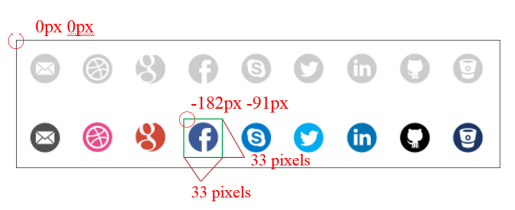
Notice that after this line of CSS code, a width and a height were defined. We have
defined the starting points to be at -182px -91px. The ending points for the image will now be 33
pixels (width value) after -182px to the right and 33 pixels (height value) after -91px down.