Commonly Used JavaScript Objects: Math and String Methods
| Site: | Philippine Science High School - MC - Knowledge Hub |
| Course: | SY25.CS3.Web Development |
| Book: | Commonly Used JavaScript Objects: Math and String Methods |
| Printed by: | , Guest user |
| Date: | Tuesday, 14 April 2026, 2:40 AM |
1. Introduction
After completing this module, you are expected to:
- Use methods within the Math and String Objects to manipulate data
An object is a data type that acts like a variable but unlike the variables that we have learned so far,
objects can contain multiple values. These multiple values correspond to the properties of the object. Objects
can also have functions or actions that can be performed specifically for/on them. These functions are called
methods. Methods can either be built-in or declared by the user.
2. Math Object and Methods
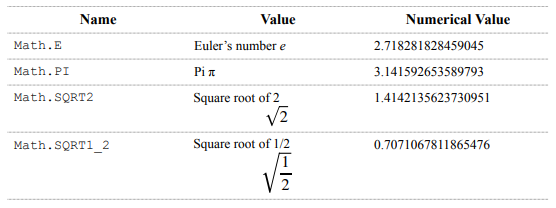
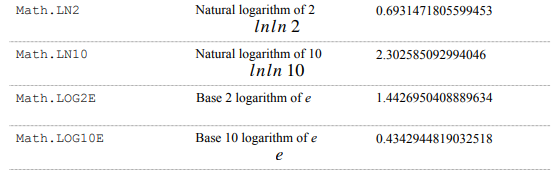
The Math Object has properties and methods that can be used to do mathematical operations and declare mathematical constants in JavaScript.
Listed below are the mathematical constants that can be declared using the Math object. Use the value
under the Names column to access the value of the constant in your code.
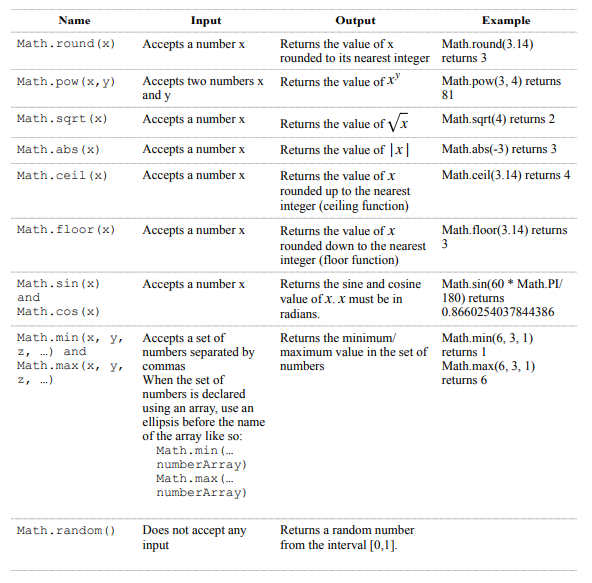
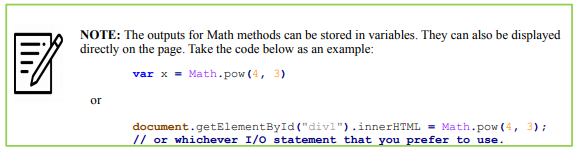
Listed below are some Math methods that we will use in class:
2.1. An example on using Math Objects and Methods
Suppose that you are given a problem of creating a function that computes the distance between two
points given their x and y coordinates. The distance formula is given as follows:

The code below is one way of implementing the distance formula.
<!DOCTYPE html>
<html>
<head>
<title>Page Title</title>
</head>
<body>
<script>
a = 2;
b = 3;
x = 3;
y = 5;
getDistance(a, b, x, y);
function getDistance(x1, y1, x2, y2){
d = Math.sqrt(Math.pow((x2-x1), 2) + Math.pow((y2-y1), 2));
window.alert(d); /* khub interprets this line */
}
</script>
</body>
</html>
Output: 2.23606797749979
For more Math methods available in JavaScript, visit the complete JS Math Reference here (https://
www.w3schools.com/jsref/jsref_obj_math.asp).
3. String Methods and Properties
Strings is a kind of data type in JavaScript. The individual elements in a string are called characters.
Before going into methods, let us learn how to manipulate strings and the individual characters inside it.
To declare a string, code it like how you would declare a number.
var name = "Uzumaki Naruto"
To access any character inside the string, we can use the format stringName[x] where x is the
index of the character that we want to access. Refer to the sample code below:
x = name[0] // returns "U"
y = name[1] // returns "z"
z = name[7] // returns the space character
a = name[20] // returns undefined
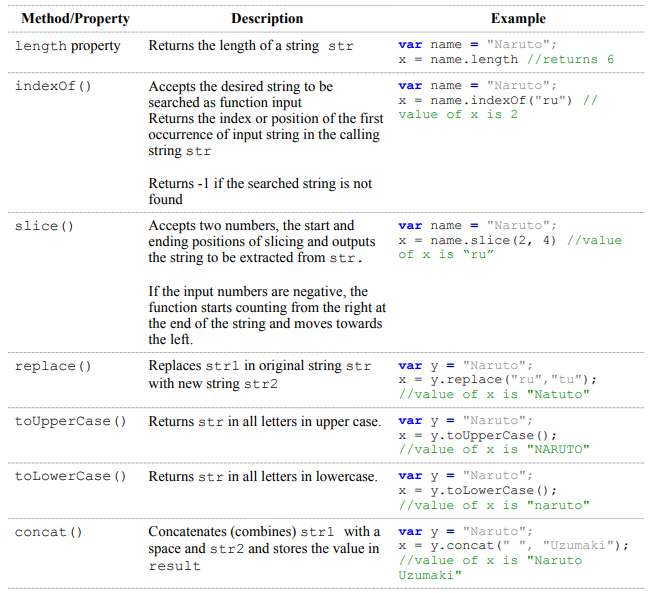
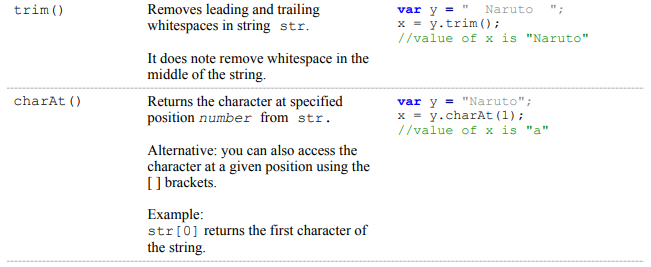
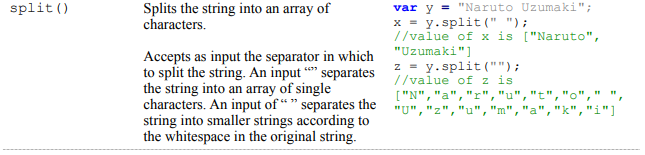

3.1. An example on using String Properties and Methods
Let’s say that you are given a programming problem of replacing all the vowels in a given string with
underscores and all consonants must be converted to uppercase. The code below is one way to solve this
problem.
<!DOCTYPE html>
<html>
<head>
<title>Page Title</title>
</head>
<body>
<script>
var name = "Uzumaki Naruto";
function solveProblem(name){
name = name.toUpperCase(); /* change all characters to uppercase */
for(i=0; i<name.length; i++){
/* test each character if it is a vowel */
if (name[i]=="A" || name[i]=="E" || name[i]=="I" || name[i]=="O" || name[i]=="U")
{
name = name.replace(name[i], "_"); /* replacing vowel with _ */
}
}
window.alert(name);
}
solveProblem(name) /* call the function in order for it execute */
</script>
</body>
</html>
Input: Uzumaki Naruto
Output: _Z_M_K_ N_R_T_
 NOTE: Replacing the statement in the code sample above name = name.replace(name[i], "_");
with name[i] = "_"; will not work because of string immutability. Refer to the given link for further
explanations regarding string immutability: https://medium.com/@codesprintpro/javascript-string-immutability-ead81df30693
NOTE: Replacing the statement in the code sample above name = name.replace(name[i], "_");
with name[i] = "_"; will not work because of string immutability. Refer to the given link for further
explanations regarding string immutability: https://medium.com/@codesprintpro/javascript-string-immutability-ead81df30693
For a complete list of String Properties and Methods, you can visit this link here (https://
www.w3schools.com/jsref/jsref_obj_string.asp).
4. Summary and References
Summary
Math and String objects are built-in features of JavaScript. They have properties and methods that are readily available for use by programmers without having to code from scratch.
References
JavaScript Math Object. (n.d.). W3Schools Online Web Tutorials. https://www.w3schools.com/js/js_math.asp
JavaScript Objects. (n.d.). W3Schools Online Web Tutorials. https://www.w3schools.com/js/js_objects.asp
JavaScript String Methods. (n.d.). W3Schools Online Web Tutorials. https://www.w3schools.com/js/ js_string_methods.asp
Lovera, J. (2016, February 14). Calculate the Max/Min value from an array. https://www.jstips.co/en/ javascript/calculate-the-max-min-value-from-an-array/
Sarawgi, S. (2020 April 19). Javascript String Immutability. Medium. https://medium.com/@codesprintpro/ javascript-string-immutability-ead81df30693