Session Handling Using localStorage
| Site: | Philippine Science High School - MC - Knowledge Hub |
| Course: | SY25.CS3.Web Development |
| Book: | Session Handling Using localStorage |
| Printed by: | , Guest user |
| Date: | Tuesday, 14 April 2026, 2:43 AM |
1. Introduction
After completing this module, you are expected to:
- Use cookies and local storage as a means of establishing sessions.
In the previous module, we have learned that cookies are used to store user information and are sent to servers with every request. To make sure that cookies do not take up bandwidth and slow down the loading of webpages, they should have small file sizes, thus must contain only a small amount of information. Another downside to cookies is they must be sent along with each request.
To solve these problems, an alternative was provided and standardized by the World Wide Web Consortium (W3C). Web storage can contain more data than cookies and they do not have to be sent to a server each time. Instead, data is stored client-side, which means that it is stored in the computer of the user. With this feature, more data is available for the website without having to sacrifice loading time. The user’s data is also more secure because it does not have to be sent to servers.
2. localStorage
There are two objects that can be used for web storage. The first is localStorage which stores data that is not deleted even when the browser is closed. The next time the user opens the webpage, the data stored in localStorage can be used again. The second is the sessionStorage object and it stores data that is present only for the duration of the user’s time with the webpage (one session). Once the browser is closed or the session is ended (i.e, the user closed the tab), the data is deleted. Data stored in this object is also available when the page is reloaded or refreshed.
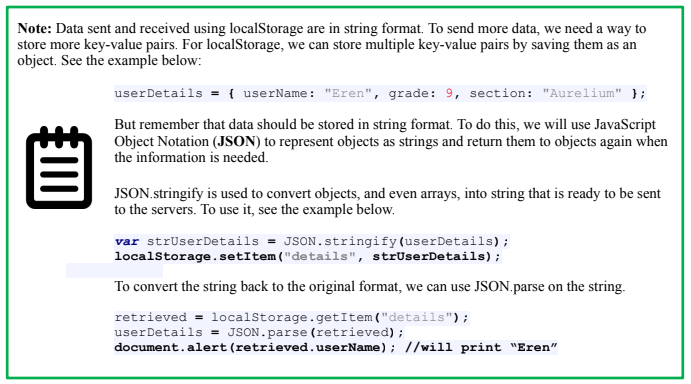
The code snippet below shows an example of checking if the browser supports local storage, setting a key-value pair for local storage if it is supported, and retrieving that key-value pair.
<div id="result"></div>
<script>
//Check if the browser supports the local storage object
if (typeof(Storage)!=="undefined"){
//set a value for storage
localStorage.setItem("greeting", "Hello World!");
//retrieve the stored value
document.getElementById("result").innerHTML = localStorage.getItem("greeting");
}else{
document.getElementById("result").innerHTML = "Sorry, your browser does not support Web Storage.";
}
</script>
Sample Output if browser supports localStorage:
Hello World!
Code explanation:
- localStorage.setItem(key, value) – accepts two arguments – the key and the value for the data being saved. If the key already exists in storage, its value overwritten,
- localStorage.getItem(key) – accepts one argument – the key name – and retrieves the value corresponding to that key.
2.1. localStorage methods
Additional methods that can be used to for local storage are as follows:
- localStorage.clear() – removes all key-value pairs stored in the local storage
- localStorage.removeItem(key) – accepts one argument – the key name – and deletes the corresponding key-value pair from the local storage.
The code below shows another example of using localStorage. In this example, a user is asked to enter a name. If there is no name currently stored, the new name is stored. If there is a value stored and it is equal to the name entered by the user, a welcome message is printed. If the value stored is not the same as the name entered by the user, a message is displayed saying that the visitor is not the expected user.
<div id="result"></div>
<script>
//Check if the browser supports the local storage object
if (typeof(Storage)!=="undefined"){
var yourName = prompt("Enter your username: ");
//retrieve the stored value
var stored = localStorage.getItem("userName");
if (stored == yourName){
//set a value for storage
localStorage.setItem("userName", yourName);
}
if (stored == yourName){
document.getElementById("result").innerHTML = "Welcome back "+yourName+"!";
}
else{
document.getElementById("result").innerHTML = "You are not "+stored+ "!";
}
} else{
document.getElementById("result").innerHTML = "Sorry, your browser does not support Web Storage.";
}
</script>
To see another example of how local storage is used in web pages, you can view an example from mozilla.org by clicking on this link (https://mdn.github.io/dom-examples/web-storage/). To see the code for localStorage in this example, right-click on the page, click “View page source” and click on the “main.js” link at the bottom of the page.
For sessionStorage, the methods are the same as local storage and they are listed below. You can try implementing the sample code above using session storage.
- sessionStorage.setItem(key, value)
- sessionStorage.getItem(key)
- sessionStorage.clear()
- sessionStorage.removeItem()
3. Summary and References
Summary
Web storage provides an alternative to cookies with larger storage spaces without sacrificing the loading time of web pages. Security is also improved because user information is stored and processed only within the user’s computer.
The methods that can be used to use local storage and session storage are listed as follows:
- localStorage.setItem(key, value)
- localStorage.getItem(key)
- localStorage.clear()
- localStorage.removeItem()
- sessionStorage.setItem(key, value)
- sessionStorage.getItem(key)
- sessionStorage.clear()
- sessionStorage.removeItem()
References
Chikwekwe, F. (2018, November 13). Cookies vs. LocalStorage: What’s the difference? Medium. https://medium.com/swlh/cookies-vs-localstorage-whats-the-difference-d99f0eb09b44
HTML Web Storage API. (n.d.). W3Schools Online Web Tutorials. https://www.w3schools.com/html/html5_webstorage.asp
JSON.parse(). (n.d.). W3Schools Online Web Tutorials. https://www.w3schools.com/js/js_json_parse.asp
JSON.stringify(). (n.d.). W3Schools Online Web Tutorials. https://www.w3schools.com/js/js_json_stringify.asp
Storage. (2021, February 19). MDN Web Docs. https://developer.mozilla.org/en-US/docs/Web/API/Storage
Storage Object. (n.d.). W3Schools Online Web Tutorials. https://www.w3schools.com/jsref/api_storage.asp
Window.localStorage. (2020, Septemeber 2). MDN Web Docs. https://developer.mozilla.org/en-US/docs/Web/API/Window/localStorage
Window.sessionStorage. (2021, March 31). MDN Web Docs. https://developer.mozilla.org/en-US/docs/Web/API/Window/sessionStorage