HTML Form tags, Form, input (radio, checkbox) and select
3. Checkboxes
Checkboxes are like radio buttons where they present the user with a group of related choices and the chosen value is the input of the user for processing. The difference between checkboxes and radio buttons is that checkboxes allow the user to choose more than one value.
The <label> tag in the example below, will also work the same way as discussed previously.
Sample code:
<form>
<h2> Add-ons for my milktea </h2>
<input type="checkbox" id="creamCheese" name="option1" value="Cream Cheese">
<label for="creamCheese"> Cream Cheese</label><br>
<input type="checkbox" id="pearls" name="option2" value="Pearls">
<label for="pearls"> Pearls </label><br>
<input type="checkbox" id="coffeeJelly" name="option3" value="Coffee Jelly">
<label for="coffeeJelly"> Coffee Jelly</label><br><br>
</form>
Sample output:
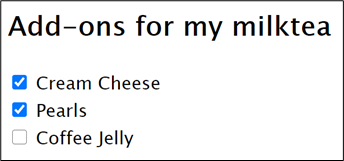
Notice that the checklist has different names.